AI-Powered MongoDB Analytics

Ask your MongoDB data
anything in plain English.

Stop writing aggregation pipelines. Point the desktop app at any MongoDB cluster, type a question, and get an instantly-rendered chart back. Safe, read-only, and ridiculously fast.

Auto-detects macOS, Windows, or Linux · Intel Mac? · view all installers
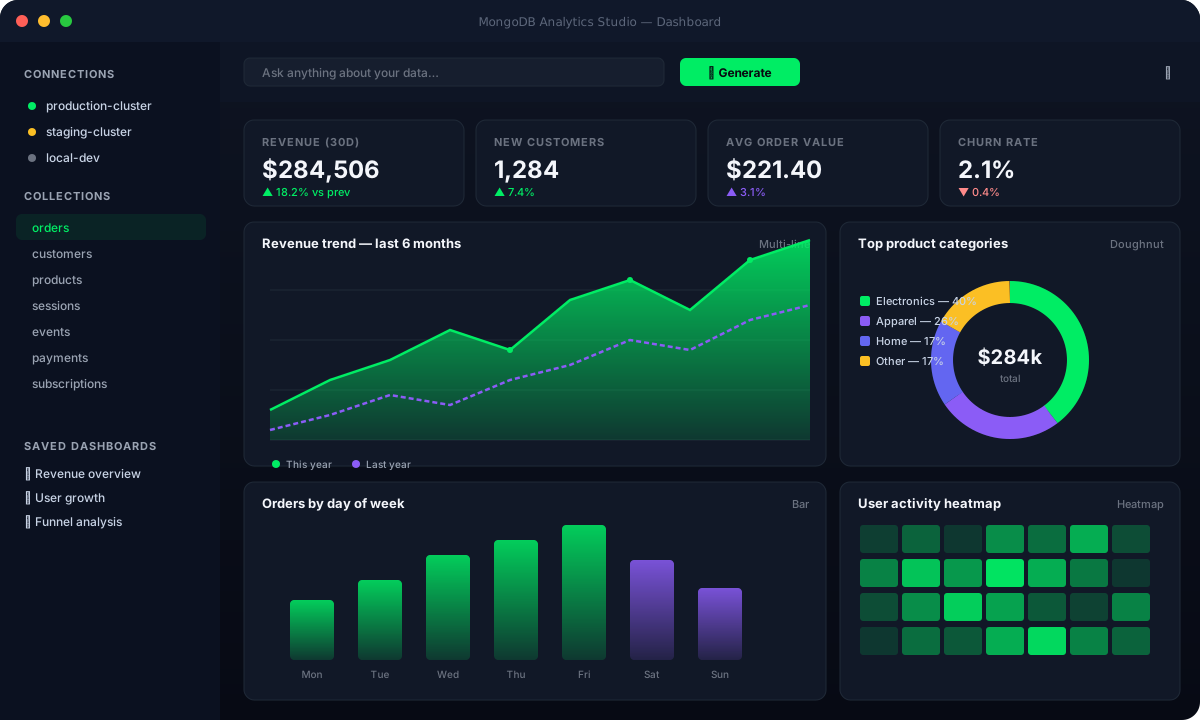
“Top 10 customers by revenue” Real-time pipelines 100% read-only Instant charts
MongoDB Analytics Studio dashboard preview
Works with MongoDB 4.4+ Atlas, self-hosted & replica sets OpenAI, Anthropic & local LLMs Native macOS, Windows, Linux
Features

Everything you need to explore your data.

From your first question to a polished dashboard in minutes — without writing a single aggregation stage.

Plain-English queries

“Show me the top 10 customers by revenue.” The AI writes the aggregation, validates it, and runs it. No query language required.

24 chart types

Bar, line, pie, heatmap, treemap, funnel, scatter, KPI cards — the app picks the best one, you can override anytime.

Read-only by design

Every pipeline is validated before it touches your database. Write stages like $out and $merge are blocked. Safe for production.

Drag-and-drop dashboards

Save any chart as a widget, then arrange them on per-connection dashboards. Auto-refresh from 30 seconds to manual.

Schema-aware suggestions

The app reads each collection’s schema and proposes ready-to-run analyses tailored to your fields. Click once, get insights.

Export anywhere

Push dashboards out as PDF, HTML, JSON, or PNG. Share with stakeholders or archive snapshots for compliance.

Workflow

Four steps from question to chart.

You bring a database and a question. The studio handles the rest.

1

Connect

Paste a MongoDB URI — Atlas, self-hosted, or local. Save as many connection profiles as you need.

2

Ask

Pick a collection, type a question in plain English. Add join targets if you want a cross-collection query.

3

Validate & run

The AI generates a pipeline, the safety validator checks it, and the query runs against your data with a strict timeout.

4

Visualize

Pick from 24 chart types or accept the auto-suggestion. Save it as a widget on a dashboard.

Live preview

From a question to a runnable pipeline, in one click.

Type what you want. Watch the studio compose an aggregation that joins the right collections, projects only what's needed, and respects your indexes.

  • AI auto-selects $lookup, $graphLookup, or $unionWith
  • You can edit the generated pipeline before execution
  • Every query runs with maxTimeMS enforced
  • Switch chart types without re-running
AI Panel — orders
"Show me top 10 customers by total revenue this year, joined with their plan tier."
Generated pipeline
// validated · 6 stages · read-only
[
  { $match: { createdAt: { $gte: ISODate("2026-01-01") } } },
  { $group: {
      _id: "$customerId",
      revenue: { $sum: "$total" },
      orders:  { $sum: 1 }
  } },
  { $lookup: {
      from: "customers",
      localField: "_id",
      foreignField: "_id",
      as: "customer"
  } },
  { $unwind: "$customer" },
  { $sort: { revenue: -1 } },
  { $limit: 10 }
]
Chart
→ Auto-selected: Horizontal Bar   (override anytime)
24 Charts

The right visualization, automatically picked.

From a quick KPI to a 3-axis funnel, the studio knows which chart fits your data — and you can switch any time.

Bar
Horizontal Bar
Stacked Bar
Line
Multi-Line
Area
Pie
Doughnut
Polar Area
Gauge
Scatter
Bubble
Radar
Treemap
Heatmap
Funnel
Histogram
123KPI
Table
Combo
Sparkline
Grouped Bar
Waterfall
Cards
Built-in safety

Safe to point at production.

Every AI-generated pipeline is parsed, validated, and capped before a single byte hits your database. You stay in control.

  • → Pipelines never modify data — write stages are blocked at the validator level
  • → Connection credentials stay on your machine — they’re stored in the OS keychain
  • → Strict maxTimeMS and stage-count limits prevent runaway queries
  • → Per-connection dashboards keep Dev, Staging, and Prod cleanly separated

Stage allowlist

  • ALLOW$match, $group, $sort, $project — read-only shaping
  • ALLOW$lookup, $unionWith, $graphLookup — cross-collection reads
  • ALLOW$setWindowFields, $bucket, $facet — analytics
  • BLOCK$out, $merge — would write to a collection
  • BLOCK$function, $accumulator — arbitrary code execution
  • BLOCK$collStats, system.* — admin internals
FAQ

Frequently asked.

Where does my data go?
Nowhere except between your machine and your MongoDB cluster. Pipelines and results never leave your computer. Only your natural-language question and the database schema metadata are sent to your chosen LLM provider — and you can point at a local model to keep even that on-device.
Which LLM providers are supported?
OpenAI, Anthropic, and any OpenAI-compatible local endpoint (Ollama, LM Studio, vLLM, etc.). Bring your own API key — the app never proxies your requests through a third party.
Will it work on a 200-million-document collection?
Yes — every query enforces a maxTimeMS ceiling and the AI is prompted to add early $match stages and respect existing indexes. For very large scans, the Collection Viewer shows index coverage so you can pick the right starting point.
Can I share dashboards with my team?
Dashboards live per-connection on each machine, but you can export them to PDF, HTML, PNG, or JSON. The JSON export can be imported by a teammate who has access to the same cluster.
Is it really free?
The desktop app is open source under the MIT license — yours to use, fork, and modify. Optional paid tiers (priority support, hosted dashboards, enterprise SSO) are listed on the download page.

Stop writing aggregations.
Start asking questions.

Download MongoDB Analytics Studio and connect your first cluster in under a minute.

Download for your platform

Auto-detects macOS, Windows, or Linux · Intel Mac? · view all installers
Free & open source · MIT license · No account required